
Google is indexing those filter URLs because the store hands them over. Every filter option is an ordinary link, every combination of filters produces a new URL that returns a normal page, and nothing in the code tells Google which of those pages matter. The fix is to decide which filtered pages deserve to rank, mark the rest noindex until Google drops them, and only then stop them being crawled, through robots.txt and through the way the filter links are rendered.
That sequence is deliberate. Google can only read a noindex on a page it is allowed to fetch, so blocking the URLs in robots.txt first can leave filter pages it already knows about stuck in the index.
What faceted navigation is, and why it multiplies URLs
Faceted navigation is the filter panel on a category page: colour, size, brand, price range, availability. The facets can be combined, so a shopper can pick two colours, one size and a brand at the same time. Most stores record each selection in the URL so the filtered page can be shared, bookmarked and reloaded.
Seeing thousands of filter URLs in Search Console? I make this fix in the code, in the order above, as part of technical SEO work for agencies. Send me the store's URL and I'll tell you how far the index has grown.
Each filter option is a link, each link leads to a page with more filter links on it, and a crawler follows them. Add sort orders, pagination, and filters that can appear in the URL in either order, and a modest catalogue produces far more URLs than it has products. Most of those pages list a subset of the same products under the parent category's title and heading, which leaves Google with a large pile of near-duplicates to choose between.
Google's documentation on faceted navigation URLs treats them as a source of overcrawling and splits its advice two ways: keep crawlers out of filter URLs you don't need in search, or, for the ones you do need, make them consistent and well behaved. Its crawl budget guide is written for large sites. On a smaller store I'd worry less about crawl budget and more about an index full of near-copies of the client's category pages, since that is what shows up in Search Console and gets noticed.
Where the filter URLs come from on PrestaShop
On PrestaShop, category filters normally come from a faceted search module. Before planning anything, click a few filters on the live store and write down exactly what the address bar shows: which parameter or path segment holds the filters, which holds the sort order and which holds the page number. Every rule you write later has to match those patterns and nothing else.
Older and inherited stores sometimes replace the default with a third-party filter module, and some of these build "SEO-friendly" filter URLs as clean paths rather than query strings. Those are harder to handle, because a path doesn't announce itself as a filter, so a robots.txt rule has to match that module's own pattern without catching real category URLs. If you've just taken over a store like that, map it along with the overrides and modules covered in So you've inherited a PrestaShop client. Now what?
Don't assume the store's existing robots.txt already covers the filter URLs. Read the live file and test it against real filter URLs taken from the store.
Where they come from on WooCommerce
A WooCommerce store gets its filter URLs from the built-in layered navigation, from a filter plugin, or from both, and the parameters differ from one setup to the next. Do the same exercise as on PrestaShop: apply a couple of filters, change the sort order, go to page two, and note what each action adds to the URL. Some filter plugins produce path-based URLs instead of parameters, which brings the same matching problem described above.
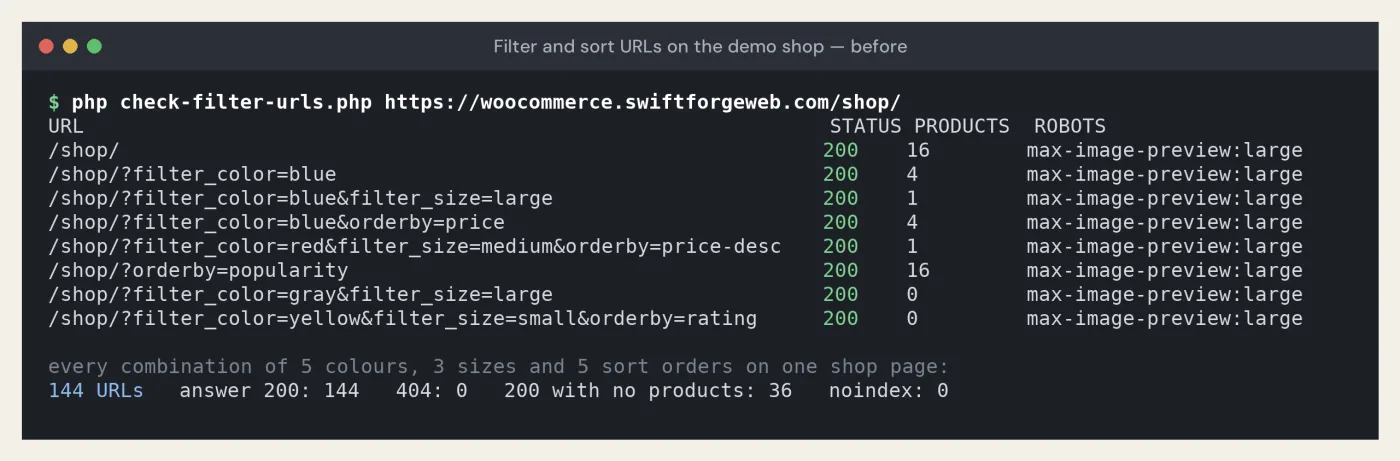
While you're at it, check the server access logs for any other query-string URLs Googlebot requests on category pages. Filters may not be the only parameters the theme or plugins put into links, and the rules need to account for all of them.
The fix, in the order that works
Do this on a staging copy first, with a backup of every file you change on live. A robots.txt rule or a noindex condition that matches too much can take real category or product pages out of Google, and getting them back isn't instant.
- Export the indexed and crawled URLs. Search Console's page indexing report and the server access logs (filtered to Googlebot) show which filter parameters and paths are actually being hit. Group them by pattern.
- Decide which filtered pages deserve to rank. I'd keep this list short and limit it to combinations people actually search for, such as a brand within a category. Each one becomes a proper landing page with a clean URL, its own title, heading and some text, a self-referencing canonical, a place in the sitemap and an ordinary HTML link from the category page. The list should come from the client or their SEO team, because it is a decision about what the store wants to rank for.
- Add noindex to every other filter and sort URL, using a meta robots tag in the page head or an X-Robots-Tag header. Don't also point their canonical at the unfiltered category: noindex says "leave this page out", a canonical says "treat this page as a copy of that one", and sending both gives Google two conflicting instructions. Leave these URLs crawlable for now, because Google's noindex documentation says the rule only works if the page isn't blocked by robots.txt. Filtered views on page two and beyond count as filter URLs here.
- For filter URLs that stay crawlable, return a 404 when a combination has no products. Google's faceted navigation page recommends a 404 for filter combinations that return no results. The 404 response should still render a useful page for the shopper, with the filter panel, a short message and a way to clear the filters. Apply the condition only to filtered requests, so a real category that happens to be empty for a while doesn't start returning 404.
- Stop generating crawlable links for the filters you've noindexed. Render those options as checkboxes or buttons that update the listing with JavaScript, and update the address bar with the history API so the shopper can still share the result. Keep the landing-page filters from step 2 as real anchor links, or Google loses its way to the pages you want ranked. Use real form controls so the filters still work by keyboard and screen reader, and check whether analytics or tracking relies on the old filter links. This changes something shoppers use on every visit, so test it on staging across browsers and on mobile before it goes live.
- Once the noindexed URLs have dropped out of the index, which the page indexing report will show, add robots.txt disallow rules for the filter and sort parameters. Test every rule against your exported list of real URLs, including products, categories, pagination and the landing pages from step 2, before it goes live.
The unfiltered category's own pagination stays indexable and linked, with no noindex. Google's pagination guidance says each page in a paginated sequence should have its own canonical rather than pointing to page one, and the same applies to paginated landing pages from step 2. The robots.txt rule in step 6 must not catch the page-number parameter on its own.
Don't rely on the canonical tag to do the whole job. Google describes canonicals as a signal rather than a directive, and it may choose a different canonical from the one you set. I'd use canonicals for what they're for (landing pages and paginated pages pointing to themselves, parameter variants of a landing page pointing to its clean URL) and handle the rest with noindex and crawl control.
Where the change goes in the code
On PrestaShop, I'd put the robots and canonical logic in a small custom module rather than an override or an edited core file. A module that hooks into the page header can read the current request, check for filter and sort parameters and print the right meta tags, and it can be switched off cleanly if something misbehaves. If the theme's head template already prints a robots tag, change it there instead, so the page doesn't end up with two contradictory tags. The filter link rendering lives in the filter module's templates, and those should be overridden in the theme rather than edited inside the module, or the next module update will undo the work.
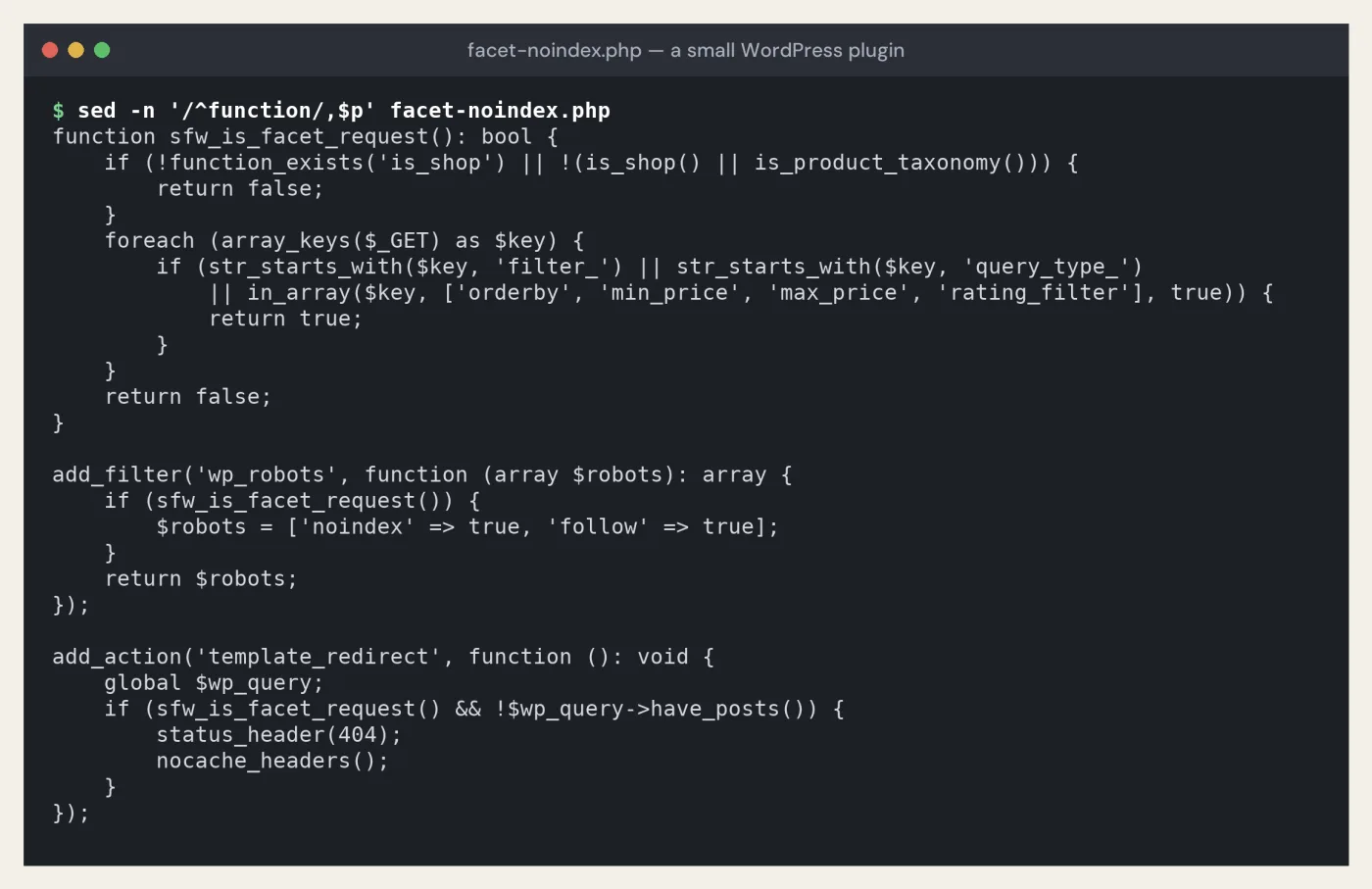
On WooCommerce, WordPress core has a wp_robots filter that a small plugin can use to add noindex when filter or sort parameters are present. If an SEO plugin already controls robots and canonical output, hook into that plugin's own filters instead of printing a second set of tags, and check the rendered head afterwards for duplicates. How the filter links are rendered depends on which filter plugin is installed, so that part needs a look at the actual store before anyone can scope it. It belongs in custom code that won't be overwritten when the plugin updates.
On both platforms, I'd also make the code build filter URLs with the parameters in one fixed order, so the same selection always produces the same URL.
Checking that it worked
Before deployment, crawl the staging copy with a desktop crawler and check that unfiltered categories, products, pagination and landing pages are indexable with self-referencing canonicals, that filter and sort URLs carry noindex, and that empty combinations return 404. After deployment, use Search Console's URL inspection on a sample of each URL type to confirm Google sees the same thing.
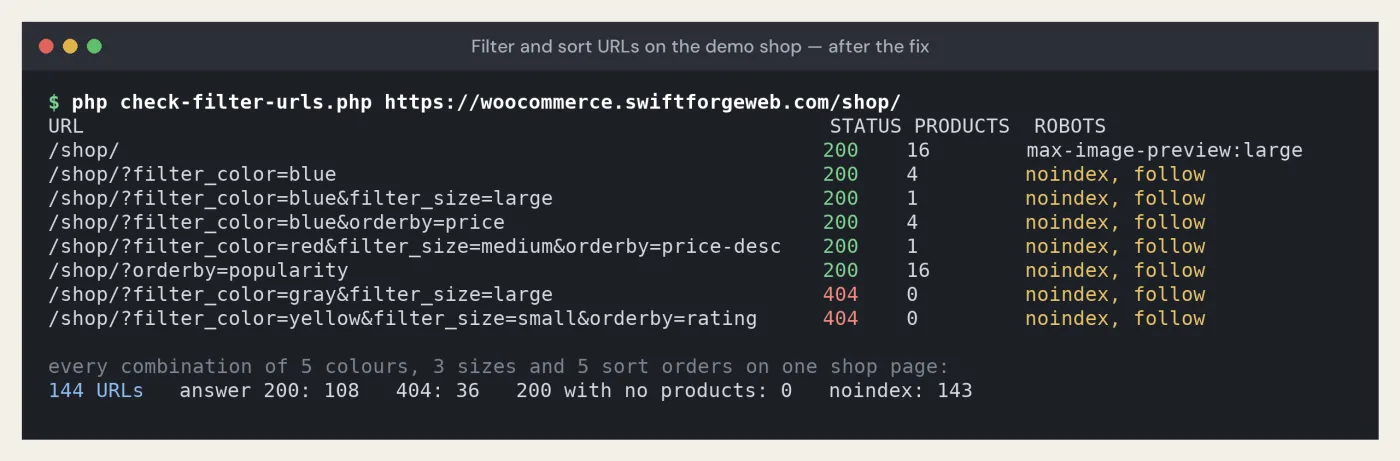
Then watch the page indexing report. The count of URLs excluded by the noindex tag should rise while indexed filter URLs fall, and there's no fixed timetable for how quickly Google recrawls the old ones. If URLs start appearing as "Indexed, though blocked by robots.txt", the robots.txt step went in before Google had dropped them, and the disallow needs to come out until it has. The server logs should show Googlebot's requests to filter URLs falling once the links are gone from the HTML.
Handing it to a developer
The work touches templates, the filter module or plugin, the SEO plugin if there is one, and the sitemap, and the robots.txt step has to wait until Google has dropped the noindexed URLs, so it can't all ship on one day. Scope it with that in mind. A useful brief includes the store URL, the platform, the filter module or plugin in use, a Search Console export of the affected URLs, and the list of filtered pages your client or their SEO team wants to rank. If the client hasn't decided that list yet, get the decision before the developer starts, because every rule depends on it.
This is part of the technical SEO work I do for agencies under their brand, done on staging and handed over as the code plus a short written summary, as described in How I work with agencies. Whoever does the work, make sure you end up with three things in writing: which URL patterns get noindex, which will get a robots.txt block once they've left the index, and which filter pages are kept as landing pages. The next developer on the store will need all three.
Working through this on a client's store? Send me the URL and what you've found so far, and I'll tell you what I would check first and whether it needs more than a checklist, NDA first if you want one. Send me the URL.