An override is a copy of a PrestaShop core method that someone changed and saved in a separate folder, and PrestaShop runs that copy in place of the original. An upgrade changes the core around it, but the copy stays exactly as it was written, so the shop ends up running old code inside new code. The replacement is a small custom module that uses hooks, with an override kept only where nothing else can do the job, and kept as small as possible.
For an agency this tends to arrive as a client asking for a "simple" version upgrade on a store someone else built. In my opinion the override folder holds most of the uncertainty in that job, so it is the first thing I look at before putting a scope together.
What an override is
PrestaShop's core classes carry a Core suffix in their names, such as CartCore or ProductCore, while the rest of the code refers to the plain names, Cart and Product. A file in /override/classes can declare its own Cart class that extends CartCore, and PrestaShop then uses that class wherever the shop asks for a cart. Any method defined in it replaces the core method for the whole shop. Front controllers can be overridden in a similar way from /override/controllers. PrestaShop's developer documentation on overrides covers how both work.
Upgrading a store full of overrides? I go through /override before the upgrade and replace what I can with hooks in a custom module, on a staging copy and under your name. Send me the store's version and the override list and I'll scope it.
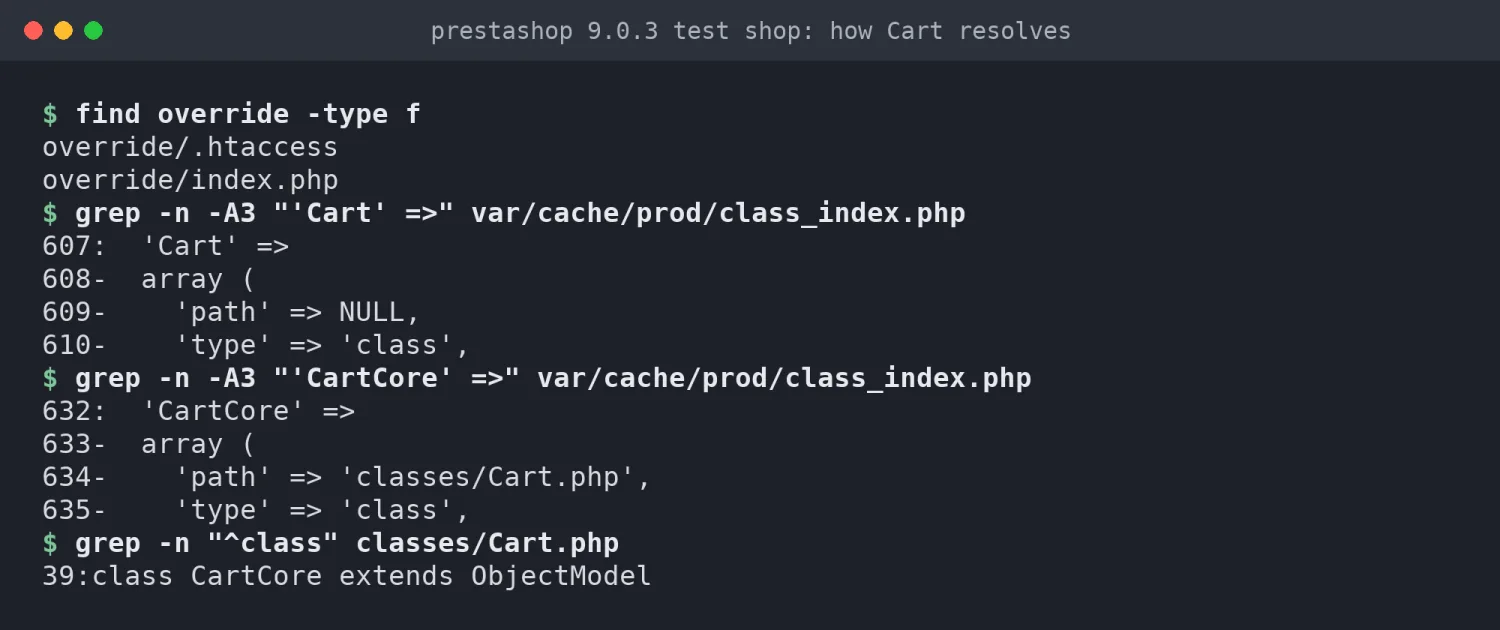
The trouble starts with the easiest way to write one. To change two lines in a long method, the developer copies the whole method into the override and edits it there. The override then holds a full copy of the core method as it stood on the day it was written, and unless someone left a comment, nothing tells the next developer which lines were changed or why.
Why a PrestaShop upgrade breaks overrides
An upgrade brings new core files. It has no way of knowing what an override was written to do, and it doesn't rewrite the files in /override to match the new core. Three things can then happen, listed here from the easiest to spot to the hardest.
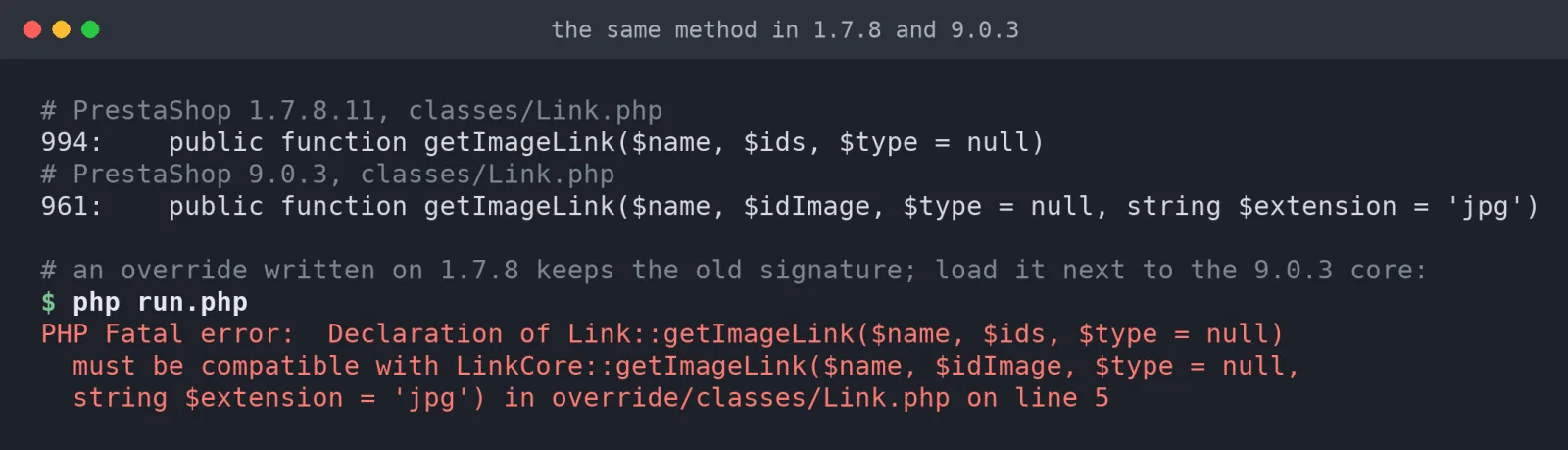
The first is a changed method signature. If the new core adds a parameter, a type declaration or a return type to a method that the override redefines, PHP refuses to load the overriding class and stops with a fatal error about an incompatible declaration. Every page that loads that class fails. On a staging copy this shows up on the first test run.
The second is a method that was renamed, moved or removed in the new version. The override still defines it, but nothing in the core calls it any more, so the customisation stops working without any error. You only find it by testing the specific behaviour the override was there for, which is hard when nobody recorded what that was.
The third is a method whose signature stayed the same while its body changed. The override loads and runs the old body. Whatever the core team fixed or changed inside that method in the new version is skipped, because the override replaced the method as a whole. Nothing errors, and what goes wrong depends on how far the old logic has drifted from the rest of the new code. I treat these as the most dangerous of the three for that reason.
Edits made directly in core files are a separate risk. Some inherited installs have changes inside /classes or /controllers themselves, and an upgrade usually overwrites those files along with the changes. If you're picking up a store, compare its core files against a clean download of the same version before you plan the upgrade.
Overrides that come with modules
Not every override was written by whoever built the store. A module can bring its own override files, so an override of the cart or product class may belong to a third-party module rather than to custom work. That module's override was written against the core version its author tested with, and it goes out of date on an upgrade like any other until the vendor releases an update. Before upgrading, check whether each such module has a release for the target version and read its changelog for anything about overrides.
What should replace them
A hook is a named point in the core code where PrestaShop calls every module registered for it and passes along the relevant data. Display hooks let a module add output to a page; action hooks let it react when something happens, such as an order being validated. The official hooks documentation explains how a module registers for them. The module doesn't replace any core method, so when the core changes between versions, it keeps working as long as the hook it uses still exists and passes the same data.
In practice that means a custom module that belongs to the client's store, holds the client's logic and registers for the hooks it needs. Before writing one, check whether a hook already covers the case in the target version. Some overrides were written where a hook would have done, and moving those into a module is usually straightforward.
Parts of the newer back office are built on Symfony. There, the usual way to change how a service behaves is decoration: you register your own service that wraps the original, adds your behaviour and passes the call on to it. The Symfony documentation on service decoration describes the pattern.
Some overrides need no replacement at all. If one patched a core bug that the target version has fixed, or supports a feature the client no longer uses, it can be deleted once you have confirmed both on staging.
Theme templates that replace module templates are also copies that can drift. A stale template usually shows up as a display problem you can see on staging, so I audit those after the PHP overrides.
Auditing overrides before an upgrade
Do all of this on a staging copy with a full backup of files and database, not on the live store.
- List every file in /override, including the controller subfolders, and note which methods each one redefines.
- Work out whether each override came with a module or was added by hand. Module overrides depend on that module's update; hand-added ones are part of your scope.
- Compare each overridden method with the same method in the current core and in the target version. The first comparison shows what the override changed; the second shows what the upgrade will change underneath it.
- Decide per method whether to replace it with a hook in a custom module, keep it and cut it down, or delete it.
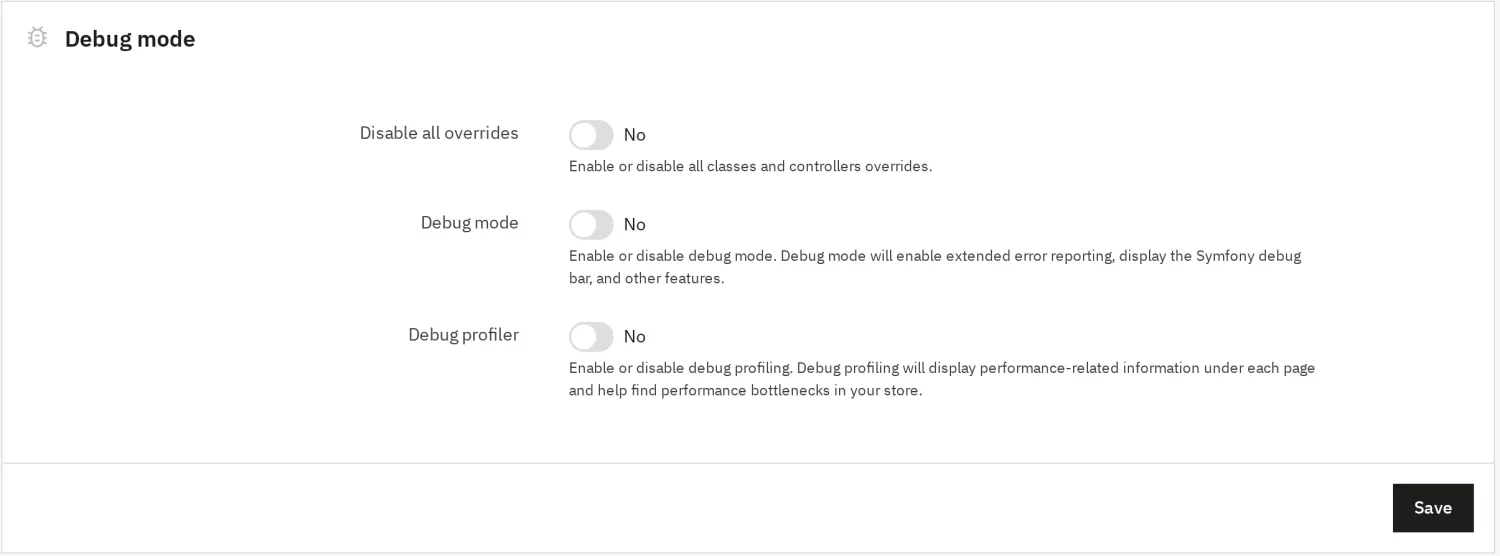
- On staging, turn on the option to disable all overrides (in recent versions it is under Advanced Parameters > Performance) and go through the shop, checkout included. Anything that breaks or behaves differently depends on an override you still need to account for.
- Run the upgrade on staging once the list is settled, then test checkout, taxes, vouchers and order emails with realistic test orders before anything goes near the live store.
Removing an override often means disabling or uninstalling the module that brought it. Uninstalling a module can delete its database tables and configuration, so export anything the client needs first, and check on staging what that module's uninstall actually removes.
If you've just taken the store over from another agency or from a developer who disappeared, the override audit fits into the wider check in what to do when you've inherited a PrestaShop client.
When an override is the only option
Sometimes there is no hook at the right point and no service to decorate, and the client needs the behaviour anyway. Then I'd accept an override on a few conditions. Ship it inside a module, so you can see where it came from and remove it with the module. Override the smallest method that does the job. Where possible, call the parent method and adjust its result rather than copying its body, so core fixes in that method still run. Put a comment in the module saying what the override changes and why, so the next developer has something to start from on the next upgrade.
On an upgrade job I'd also recommend asking for a written note of which overrides were removed, which were replaced and with what, and which are still there. My own handover is the code plus a short written summary, as described in how I work with agencies. If you're choosing a developer for this kind of work, the questions to ask a white-label developer before the first brief cover what to check before you send anything.
Got a brief like this? Tell me the URL, the platform and what's stuck, and I'll come back with scope and a price, NDA first if you want one. Send me a brief.