
A white label development handover should give you two things you can use without the developer: the changed code, in your own repository or as a complete package, and a short written summary of what changed, how to put it live and how to undo it. If the work was done on a staging copy, you also want access to that copy, so you can show the client before anything reaches their live store. Around that sits ownership: which accounts were used, whose name the keys and licences are in, and the rights to the code in writing.
A handover can look complete on the day and still leave you stuck six months later, when the client asks for a small change and the developer is busy or gone. What follows is what I'd ask for, and why.
The code, in a form you can deploy without the developer
The best case is commits in your own repository. You can see exactly which files changed, you can roll back, and the next developer starts from a clean history. If you don't keep client stores in version control (plenty of agencies don't), ask for an archive of the changed files with their full paths, and for any custom module or plugin, the complete installable package rather than a patch against one file.
Working with me? This list is what I hand back on my own jobs. How I work with agencies, from the NDA to the handover, is on how I work, and a short brief is enough to start.
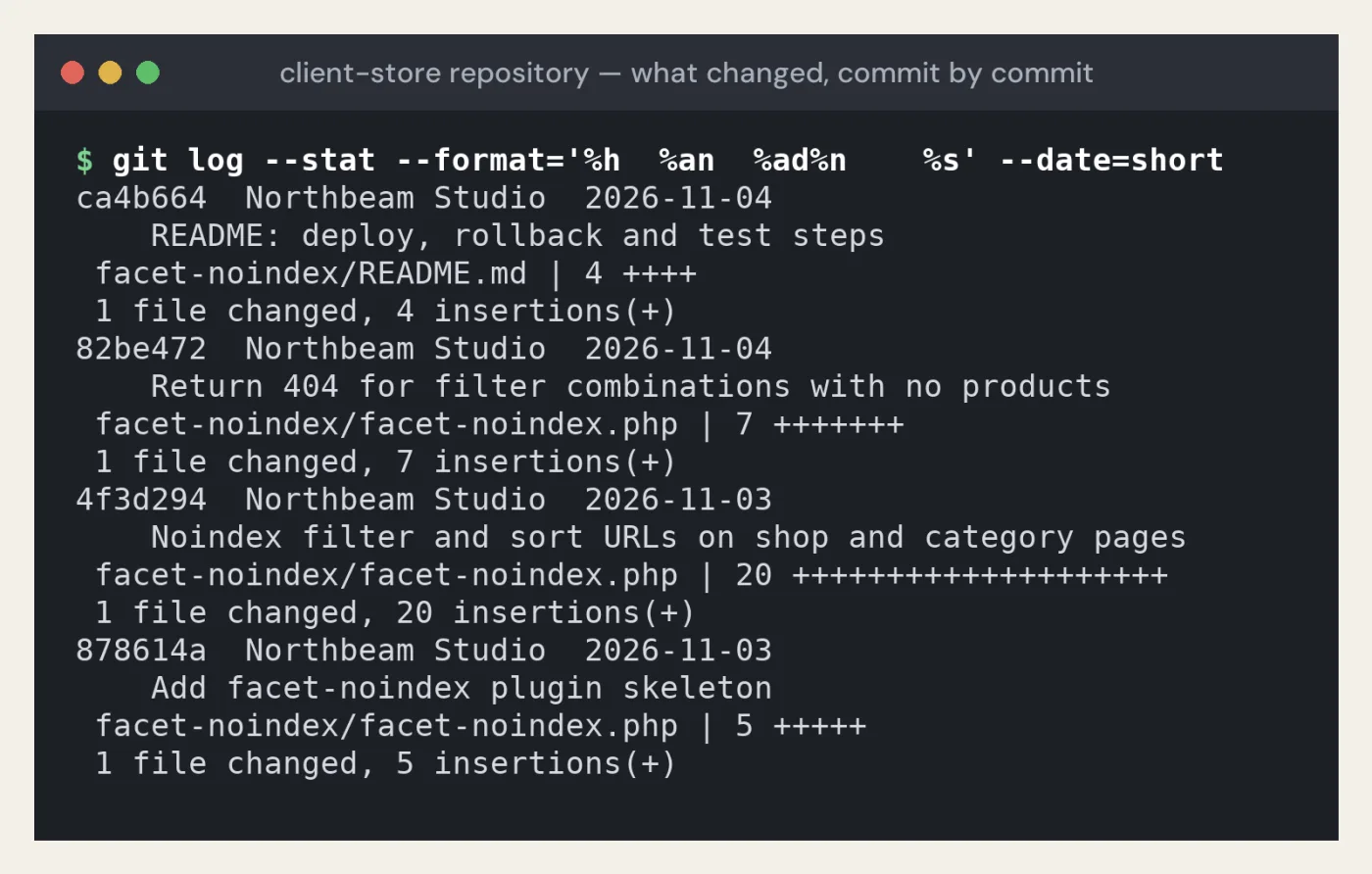
Git records an author name and email on every commit, as the git-commit documentation describes. On white-label work that metadata matters: if the commits carry the developer's name, anyone who opens the repository can see who really did the job. The same goes for file headers, code comments and the metadata inside documents. I make sure my name appears in none of those, and you should expect the same from anyone working behind your brand.
Settings and database changes
Some changes live in the database, not in the files. Settings changed in the PrestaShop back office or the WooCommerce admin, new tables a module creates, values entered into a payment or shipping configuration: none of these travel with the code.
If the developer changed any of them on staging, ask for a list of which ones and what they were set to, or for a script that applies them. Without it you deploy the code, the store behaves differently on live, and nobody can say why.
The written summary
This is the part you'll need most later. It doesn't have to be long. A page or two is usually enough, written plainly enough that you can lift whole paragraphs into an email to the client.
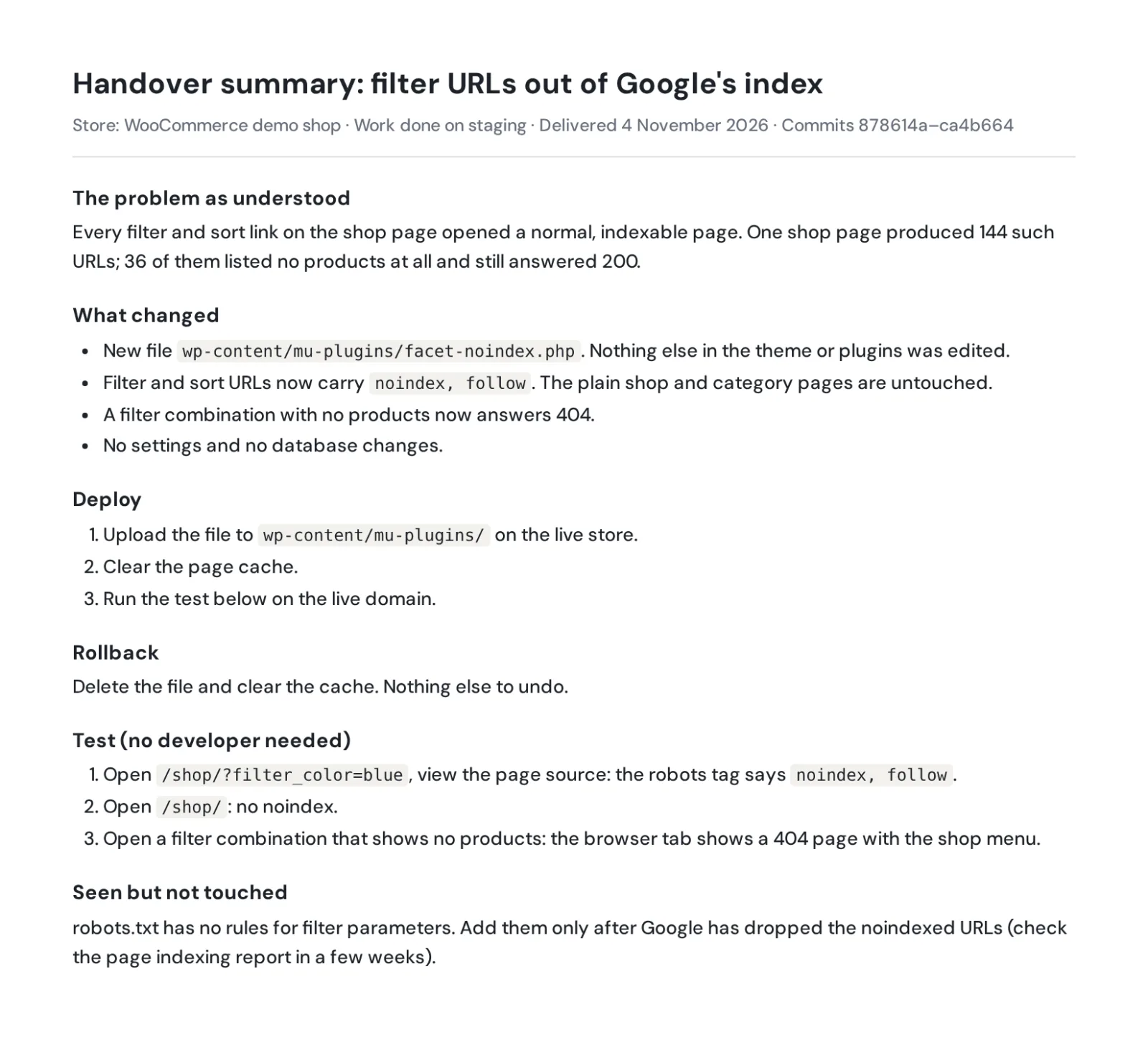
Ask for it to restate the problem as the developer understood it, so you can spot a misreading of the brief before the client does. Then what was changed and where, by file and by setting. Anything removed, disabled or replaced deserves its own mention, because those are the changes clients notice and ask about.
Deployment steps should come in order: what to upload, what to install, which caches to clear, whether the store needs to be in maintenance mode while it happens. A rollback note belongs right after, even if it's one line saying which files to restore and which setting to change back.
A short test script is worth asking for as well. These are steps someone who isn't a developer can follow to confirm the work does what was asked: add this product to the cart, apply this coupon, check that the order confirmation email arrives with the new field. You'll use it to check the work yourself, and again when you walk the client through it.
Ask, too, for a note on anything the developer noticed but didn't touch because it was out of scope: a theme template override that no longer matches the platform, or a module that hasn't been updated in a long time. With that in writing, you can raise it with the client yourself and decide with them whether it becomes a separate job.
The staging site handover
Staging is a copy of the store where work can be done and checked without touching the live one. Developers set it up in different ways (on the client's hosting, on the agency's server, on their own), so ask before the work starts where it will live, whether you'll have access to it, and how long it will stay up after handover.
Two more things to ask about. The staging URL shouldn't carry the developer's name, because the client may forward the link to someone else; mine never does. And the copy should be closed to the public and to search engines, which a password on the whole site takes care of.
If you have access, walk the client through the test script on staging and get their approval there, before anything is deployed.
Then ask how the work goes live. The live store keeps taking orders, registering customers and changing stock while staging sits still. Moving the code and the listed settings is safe in that respect. Copying the staging database over the live one would wipe every order and customer that came in since the copy was made. Whoever deploys should also take a full backup of the live store's files and database just before, so the rollback note has something to roll back to.
Access, accounts and ownership
Ask for a list of every account the developer used: hosting or SSH, admin logins, FTP, any API dashboards. Once the work is live and checked, close those accounts or change their passwords. Check first that nothing runs on them. An integration connected with the developer's own API user, or a scheduled task that logs in with a password you're about to change, will stop without telling anyone. Change one at a time and confirm the store and its integrations still work after each.
Anything the work depends on should belong to the client or to you, not to the developer. API keys for an ERP or shipping integration should be created in the client's account. Paid modules or plugins should be licensed in the client's or the agency's name, so updates and support keep working after the developer has moved on.
On the legal side, you want the rights to the code in writing. My terms make the work a work-for-hire, assigned to the agency on final payment, with an NDA signed before any brief is shared. Whatever your developer's terms are, check that ownership transfers to you and that nothing in the delivered code is something they intend to keep licensing back to you.
Notes for the next platform update
A platform or theme update is where undocumented work usually breaks, so the summary should flag anything sensitive to one.
On PrestaShop, that means overrides: code that replaces part of a core class or controller instead of hooking into it (a hook is a point where the platform lets a module add or change behaviour without replacing anything). Overrides work, but they can conflict when an upgrade changes the original or when another module tries to override the same thing. If the developer used one, the summary should say which class, why a hook wasn't enough, and what to check after upgrading. I'd want that from any PrestaShop developer for agencies, because PrestaShop is rare in the US and the next person to open the store may have no history with it. In my opinion, undocumented overrides are one of the things that make an inherited PrestaShop install slow to work on, since nothing in the back office shows they're there.
On WooCommerce, the equivalent is template overrides in the theme. A theme can carry its own copies of WooCommerce templates, and when WooCommerce changes the originals, those copies can fall behind. If the work added or edited one, you need to know which. I think custom functionality is usually safer in a small plugin than in the theme's functions file, because a plugin survives a theme change. If the developer put it in the theme, the summary should say why.
Cron jobs and other scheduled tasks, webhooks registered with an outside service, a PHP extension the code needs and new email templates don't show up when you look at the changed files. Each should be written down, with where it lives and what breaks if it stops running.
Checking the handover before you sign off
Go through the handover before the final invoice is paid, while the developer is still on the job and the work is fresh. A useful test for your developer handover checklist: could someone who has never seen this store deploy the work from the summary alone, and undo it? Look at the commit authors and file headers for names. Run the test script yourself on staging. Check that every account on the list has an owner on your side.
If something is missing, ask for it then. Reconstructing a settings change or the reason behind an override a month later is much harder, if the developer still answers at all. A developer disappearing with the only knowledge of how something works is the risk that actually costs you the client, and a proper handover covers most of it.
It's easier still to settle what a handover contains before the first brief goes out. It belongs on the list of questions to ask a white-label developer, next to availability and terms. I work on staging and hand back the code plus a short written summary, as set out in how I work with agencies. If a developer can't tell you up front what you'll receive at the end, ask them to put it in writing before the work starts, so you know how much of the support will fall to you.
Got a brief like this? Tell me the URL, the platform and what's stuck, and I'll come back with scope and a price, NDA first if you want one. Send me a brief.