A Magento to WooCommerce migration keeps its URLs and rankings when every old Magento address that changes gets a permanent 301 redirect straight to its new page. It keeps order history when orders and customers are imported as real WooCommerce records, with their original order numbers, on a staging copy where emails and payments are switched off, followed by a final delta import at cutover for whatever was ordered during the build. Rankings can move for a while after launch as search engines process the redirects, and how complete the redirect map is decides most of how they settle.
Start with the URL inventory, not the import
I build the list of old URLs before anything gets moved. A Magento store can have far more addresses than anyone at the agency or the client expects. Products can be reachable under several category paths, store views can add their own prefixes, layered navigation creates filtered URLs, and years of renamed products leave old rewrites behind that may still get traffic.
I take URLs from several places and merge them. Magento's URL rewrite table in the database holds the system-generated rewrites plus any custom ones added over the years. A full crawl of the live store finds what is linked today, and Magento's XML sitemap shows what the store itself submits to search engines. Landing pages in the client's analytics and the pages report in Google Search Console catch URLs that still get visits but are no longer linked from anywhere. If the client or the agency has a backlink tool, I add the pages with external links as well, since those carry signals from other sites.
The result is a spreadsheet with one row per old URL, a column for its type (product, category, CMS page, blog post, filter, junk) and an empty column for the new address. Filling that column is most of the SEO work.
Decide what the new URLs look like
With its default settings, WooCommerce puts products under a base such as /product/ and categories under /product-category/, and both bases can be changed in WordPress's permalink settings. Magento stores often use a .html suffix and sometimes nest the category path inside product URLs, which WooCommerce's default settings don't reproduce.
Moving a client off Magento? I do these white-label as a managed migration: URL inventory, redirects, order history and a tested cutover. Send me the store's URL and I'll map the scope before anything moves.
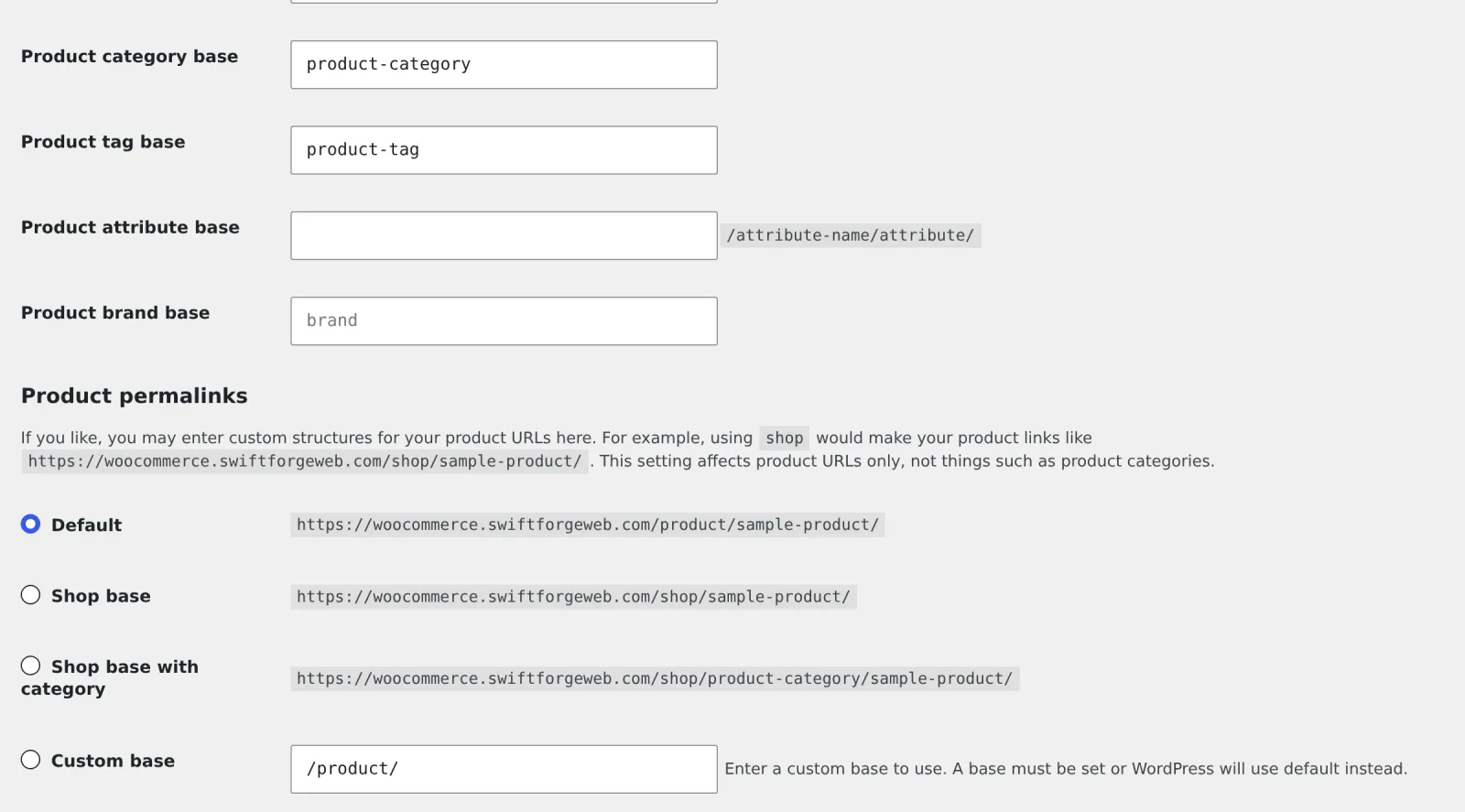
It is possible to make WordPress copy Magento's exact URLs with custom rewrite rules. I usually advise against it. Every custom rewrite is code that has to keep working through WordPress and WooCommerce updates, and the next developer to touch the site won't expect it. I would rather keep the product and category slugs (the readable part of the address) identical, accept a clean WooCommerce structure around them, and redirect once. Google's page on site moves with URL changes describes the same approach: map each old URL to its new one and set up server-side permanent redirects.
There is an exception. If the client has many strong backlinks pointing at deep product URLs, I raise keeping the old structure with the agency before anything is built, and we decide it with the trade-off on the table.
Writing the 301 redirects
A 301 is a permanent redirect: it tells browsers and search engines that the page has moved for good. Google's page on redirects and Google Search recommends permanent server-side redirects when a URL changes for good. For 301 redirects in a store migration, these are the rules I follow.
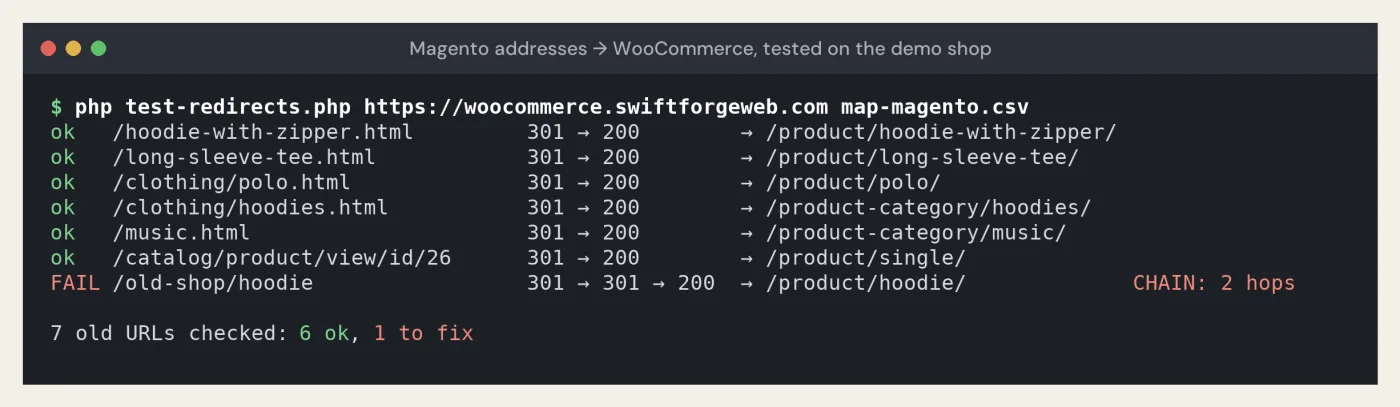
Each old URL goes straight to its final destination in one hop. Chains, where the old URL redirects to an intermediate address that redirects again, waste crawl time and are easy to create by accident when WooCommerce's own slug handling adds a hop on top of yours. I run the whole map through a test script on staging before launch and fix the chains and wrong targets it finds, then run it again against the live domain after launch.
Products that no longer exist go to their closest real replacement or to their category. If nothing sensible exists, I let the URL return a 404 or 410. Sending dead products to the homepage tells search engines nothing useful and annoys every visitor who lands there. Filtered layered-navigation URLs usually redirect to the clean category page.
Where the redirects live depends on volume and on who maintains them. A large, fixed map can sit in the web server configuration. If the client's team will need to add redirects later, a redirect plugin that stores rules in the database is easier for them to manage, at a small cost per request. Either way, the map is imported in bulk from the spreadsheet, not typed in by hand.
Orders and customers: importing history without side effects
Order history matters for two reasons. Customers expect to log in and see what they bought, and the client's support team needs to look up old orders by the number on the customer's email. So I keep the original Magento order numbers on the imported orders, alongside WooCommerce's own internal IDs, and make sure search in the admin finds them.
Order statuses need a mapping, because Magento's states and WooCommerce's statuses don't line up one to one. Magento also keeps orders, invoices, shipments and credit memos as separate records, which WooCommerce mostly folds into the order and its refunds. I agree the mapping with the agency before importing, so the client's accountant isn't surprised by refunds that show up differently.
The import runs on staging, never against a live WooCommerce site, and I switch off transactional emails and payment gateways on staging before the first run. An import with emails left on can send order confirmations to real customers about orders they placed years ago.
Customer passwords need their own decision. Magento and WordPress usually hash passwords differently, so imported customers can't normally log in with their old password without extra work. One option is to ask customers to reset their password on first login, which costs nothing to build but creates friction and support tickets. The other is a small piece of custom code that checks the old Magento hash on first login and rehashes the password the WordPress way, which customers don't notice. I put both to the agency with the trade-off and let them decide with their client.
Products are usually the easiest part, with one trap. Magento's configurable products become WooCommerce variable products, and the attributes, images and stock levels per variation have to survive the trip. I check a sample of the most complicated products by hand as well as comparing the counts.
SEO details to check on staging
A Magento to WooCommerce SEO check covers more than redirects. Custom meta titles and descriptions for products, categories and CMS pages sit in Magento fields that a generic importer may skip, and category description text, which often carries much of a category page's content, can go missing the same way. I compare a sample of each page type against the live Magento store.
Canonical tags need to point variations and filtered pages to the right main URL. Product structured data (prices, stock) should be present on the new templates. Image alt text and image file names are worth carrying over too.
If the Magento store had several store views for different languages or countries, it probably had hreflang tags, and WooCommerce needs a multilingual setup to reproduce them. That belongs in the scope from the start. Internal links inside product descriptions and CMS content will still point to old Magento URLs, and I rewrite them in the database so they don't rely on the redirects.
The staging site stays blocked from indexing for the whole build, and removing that block is a step in the cutover list below. Speed matters at this point as well, since a slower store adds to whatever ranking movement the migration causes, so I check Core Web Vitals on the WooCommerce build before launch.
Cutover day
The gap between the first full import and launch is where orders go missing, because the store keeps taking orders while you build. I rehearse the delta import on staging beforehand so I know how long it takes, which keeps the closed window short. Payment gateways are tested in their sandbox mode on staging during the build. Then the cutover follows a fixed order:
- Agree a launch window with the client at their quietest time, tell their support team, and let the client decide whether to warn customers with a notice on the old store a few days ahead.
- Take a full backup of the Magento database and files.
- Put Magento into maintenance mode. Visitors see a holding page and no new orders come in, while the installation and database stay intact on the server in case you need to roll back.
- Run the delta import: orders, customers and stock changes since the last full import.
- Point the domain at the new store, load the redirect map and remove the staging noindex.
- Once the domain resolves to WooCommerce, switch payment gateways to live credentials, check that their webhook or callback URLs use the live domain, and switch transactional emails on.
- Place a real order with a real card, check the email and the payment record, then refund it.
- Run the redirect test script against the complete list of old URLs on the live domain.
- Submit the new XML sitemap in Google Search Console.
Search Console's Change of Address tool is for moving a site to a new domain or subdomain. When the domain stays the same, as it does in most platform migrations, you don't use it. If the client is changing domain at the same time, it goes into the cutover list after the redirects are live.
If the Magento store pushed orders to an ERP or a shipping service, the WooCommerce version has to be connected and tested on staging with the same order data, or the warehouse receives nothing on the first morning after launch. These connections are often the longest part of a migration, and I scope them as their own piece of integration work.
After launch
For the first weeks I check the 404 report in Search Console and the server logs daily, and add redirects for any old URLs the inventory missed. I also compare indexed pages and impressions against the period before launch, so that a problem in one section of the store shows up early.
Google's site move guidance recommends keeping redirects in place for at least a year. I see no reason to remove them after that, since old links in emails, bookmarks and other sites keep arriving long after launch.
When I do this for an agency, the work happens on staging under your brand, and you get the code and a short written summary, which is where the password and order-number decisions are recorded. Many of the steps are shared with the other direction, so the checklist I use for PrestaShop to WooCommerce is worth reading alongside this, and the platform migrations page covers the migration work I take on.
Got a brief like this? Tell me the URL, the platform and what's stuck, and I'll come back with scope and a price, NDA first if you want one. Send me a brief.