Copy the infected store as it is, stop it doing further harm (close the shop or at least the checkout), change every password and key it uses, and call the client the same day. Finding how the attacker got in and cleaning the code follow within a day or two, on a staging copy. The version upgrade, a new host and any conversation about leaving PrestaShop wait until the store is clean, but the entry point has to be found before the cleanup is finished, because a store cleaned while the hole is still open can be reinfected through it.
The first hours: contain it and keep a copy
Don't let anyone delete suspicious files yet. Those files, their locations and their modification dates are what you will use later to trace the way in.
Dealing with one right now? Contain it, keep a copy and call the client, then find the way in before the cleanup is finished. If you want a developer on it with you, tell me what you're seeing and I'll reply with what to do first.
- Take a full copy of the files and the database as they are now, infected, and store it off the server. Label it clearly so nobody restores it by mistake later.
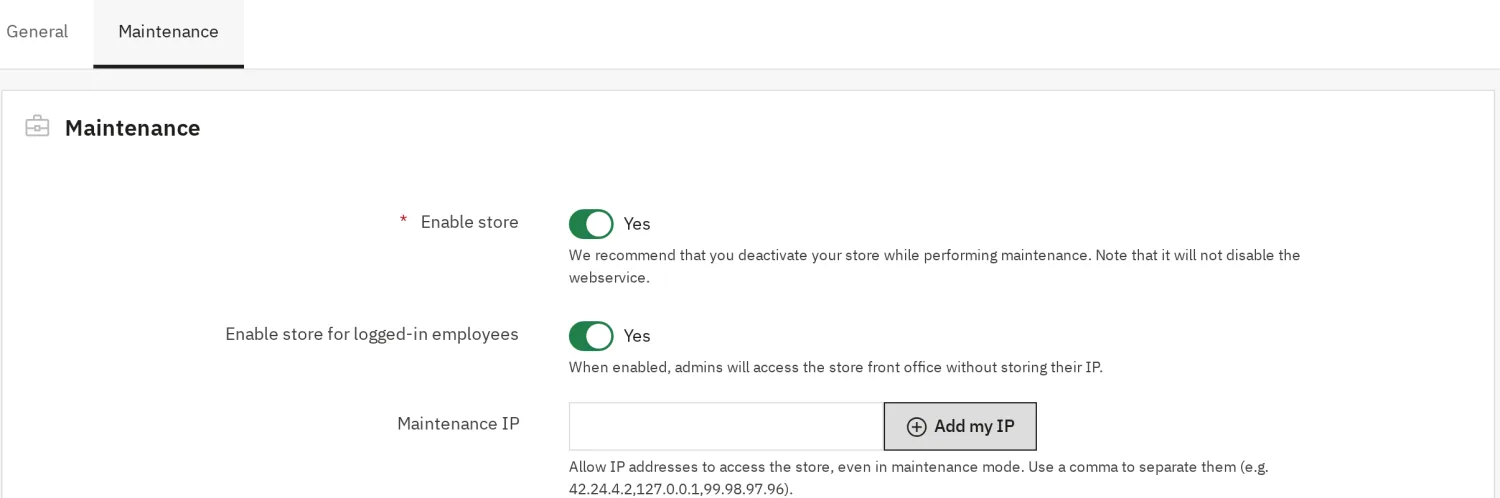
- Stop the damage. PrestaShop has a maintenance option among the shop's general settings that shows visitors a holding page instead of the shop, with a field for IP addresses that still see the shop normally. The back office stays reachable while the shop is closed, so you and the developer can keep working while customers can't browse or buy.
- If the checkout or payment pages look changed in any way, disable the card payment method or the whole checkout until you know more. Injected JavaScript that copies card details as customers type them is called a skimmer. This is the most urgent case, because every hour it runs adds customers whose card details may have been taken.
- Change the credentials: hosting panel, SFTP and SSH, the database user, every back-office employee account, and the API keys for payment, shipping, ERP or anything else connected. PrestaShop keeps the database connection details in a configuration file inside the install (which file depends on the version), so after changing the database password, update it there or the store goes down. Assume the attacker has read that file. Change only the password line; the same file holds other keys the store relies on, and those should not be regenerated without a developer who knows what each one does on that version.
- Check PrestaShop's webservice keys, in the back office's advanced settings. The webservice is the store's built-in API, and each key has a description and its own permissions per resource. Look for keys with no description, keys nobody can match to a real integration, and keys that can write rather than only read resources such as customers, orders or configurations. Write down each key's description and permissions before deleting it, and if no integration uses the webservice at all, switch it off.
- Go through the back-office employee list. Look for accounts nobody at the client recognises, especially with the SuperAdmin profile or an email on an unfamiliar domain, and for existing accounts whose email address has been changed, since that lets someone reset the password. Then open the profiles and their permissions: an order-handling profile that has been given access to modules or employees deserves the same suspicion as a new SuperAdmin. Note the email and profile of anything you remove.
All of this happens on the live store, so agree it with the client first. Maintenance mode and a disabled checkout stop sales, and they need to know that before it happens. Once the database password and API keys are changed, check that orders still come through and that payment confirmations still arrive: a payment module whose key no longer matches the gateway can leave paid orders sitting as unpaid.
If other sites share the same hosting account, check them as well. Depending on how the host separates accounts, file access to one site can mean access to the others.
Tell the client the same day
Call the client even if you know very little yet. Tell them what you know, what you don't know, what has already been done, and when they will hear from you next. Don't guess at the cause on the first call, and don't call it "nothing serious" before anyone has checked.
If customer data may have been read, there may be a legal clock running. Where the client is a controller subject to the GDPR, Article 33 of the GDPR requires notifying the supervisory authority of a personal data breach within 72 hours of becoming aware of it, where feasible. Whether to notify, and whom, is for the client and their lawyer. Follow the call with an email that records what you know and when you first became aware of the breach, since that is when the 72 hours start.
Then find out how they got in
Once nothing new is appearing, look for the entry point. On PrestaShop I start with the modules folder, because it holds most of the third-party code on the store and usually nobody at the client has read any of it.
Compare the folders in it with the list in the back office's module manager. A folder the manager doesn't show needs opening, and so does a listed module nobody remembers installing. A normal module has a main PHP file named after its folder, containing a class that extends PrestaShop's Module class; a folder with one oddly named file, or with code packed into long encoded strings, is not normal. Then check every installed module and its version against the advisories that Friends of Presta publishes, which list PrestaShop modules with known vulnerabilities and the versions affected.
Ask where each paid module came from. PrestaShop itself is open source and free to download, but many of the modules people add are paid, and copies of those offered free on download sites can contain extra code. If the client can't show where a module was bought, treat it as a suspect.
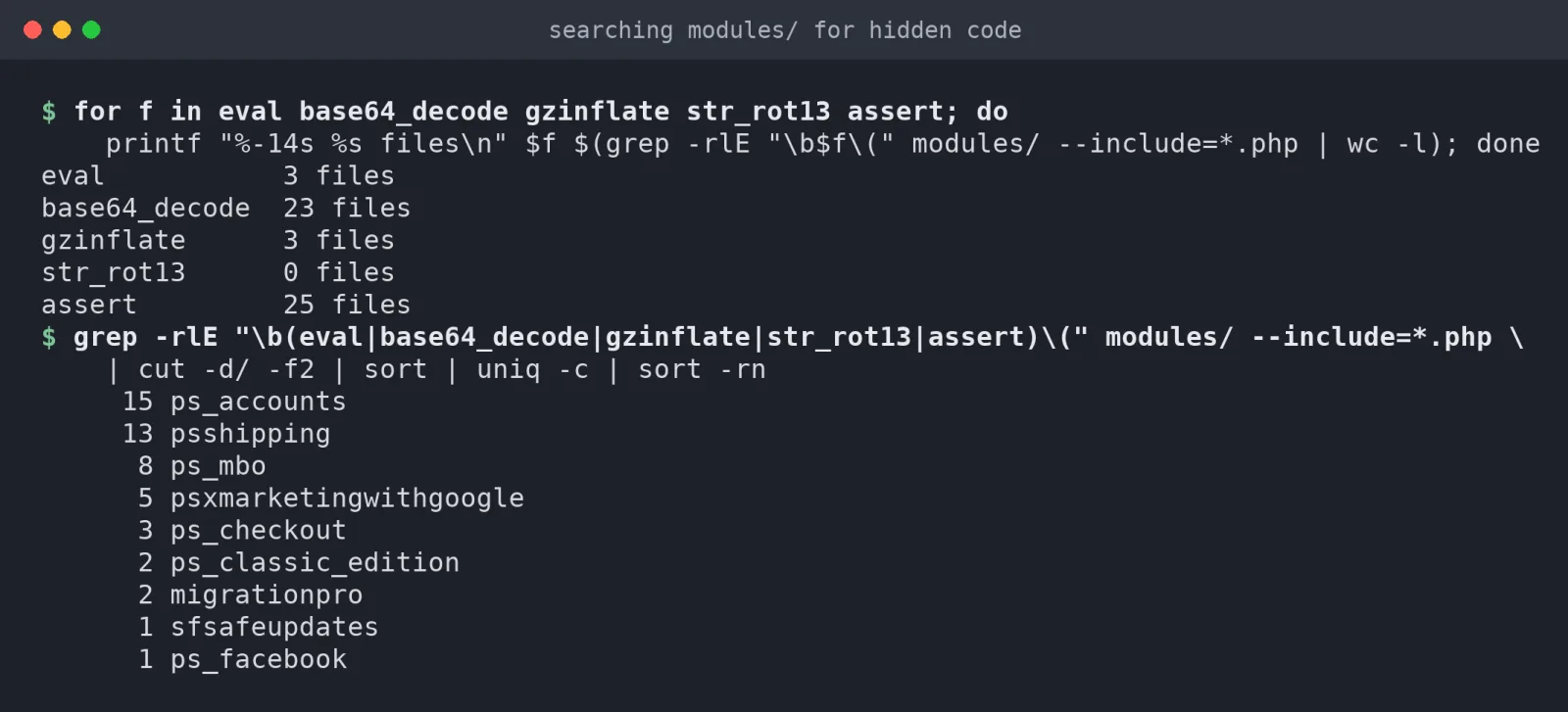
To find hidden code, search the PHP files across the install for functions attackers use to unpack and run it: eval, base64_decode, gzinflate, str_rot13 and assert. Legitimate modules use some of these, so every hit needs reading rather than deleting. PrestaShop also puts a small index.php in almost every folder, and all it does is send the visitor elsewhere. One that is larger than its neighbours, or contains anything else, needs explaining. The img, upload and download folders normally hold product images and customer files, so any PHP file there is suspect. Sorting the theme and module files by modification date is crude, and dates can be faked, but it often turns up the first thread.
Check the core version against PrestaShop's own security advisories on GitHub; an unpatched store on a listed version is a candidate. Read every file under override/classes and override/controllers, whatever its name. PrestaShop lets modules and developers replace core classes there, and an attacker can use the same mechanism to run code on every page. After removing anything from it, clear the cache so PrestaShop rebuilds its class index from what is actually in the folder.
The back office also has a page listing which modules are attached to which hooks (the points in the page where a module can add output). An unfamiliar module attached to the page header or to the payment hooks is worth a close look, because that is where injected scripts tend to be placed.
In the database, search the configuration table, CMS pages, product and category descriptions and module settings for script and iframe tags, long base64 strings and domains nobody recognises. On the server, read the access logs around the time the first suspicious file appeared, looking for direct requests to PHP files inside module folders, and list any cron jobs on the account that nobody set up.
The installer gives the admin folder a random name so that the login page is harder to find. Check whether that name has been shared widely over the years, in emails, tickets or shared documents. If it has, weak or reused employee passwords become a likelier way in, and the access logs may show repeated requests to the login page.
Keep notes with dates and file paths as you go. They become the written summary the client gets at the end.
Clean from known-good copies
Rather than deleting the files found so far and hoping that was all of them, I rebuild the code from known-good sources and compare, on a staging copy rather than the live store.
That means a fresh copy of the same PrestaShop version from the official release, fresh copies of each module from wherever it was bought, and a file-by-file comparison against what is on the server. Every difference gets looked at by a person; some will be the client's own customisations, which need keeping. The theme and the overrides usually have no clean original to compare against, so they need reading by hand. The database gets the same check for injected content.
Be careful with backups. Nobody knows yet when the attacker first got in, so a recent backup may already contain the infection, and restoring it without checking can bring the problem back. Restoring an older one loses every order and customer since it was taken. If you do restore, check the backup first and plan how to carry across the orders from the gap.
When the staging copy is clean and the hole is closed, deploy the cleaned code, but apply the database fixes to the live database rather than copying the staging database over it, or the orders placed since the copy was taken are lost. Then change the credentials once more in case anything leaked during the cleanup, clear the cache, and keep watching for modified files for a few weeks.
What can wait
The version upgrade can wait. An old PrestaShop release needs upgrading, but an upgrade is a project in its own right, with its own risks to modules and overrides, and doing it in the middle of an incident mixes two sets of problems so you can't tell which broke what. Patch the specific hole now, and schedule the upgrade once the store is clean and stable, tested on staging first.
Moving host, changing platform and the redesign the client was already discussing can also wait. After a hack a client may want to leave PrestaShop altogether. That can be the right call, but a migration needs planning, and starting one before the old store is cleaned can carry injected content across in product descriptions and CMS pages. A move also does nothing for customer data that was already exposed, so the notification question stays open either way.
Who should be doing this
PrestaShop is rare in the US, so an agency that inherits a PrestaShop client often has nobody lined up to call when it breaks. If the store came to you from another agency or a freelancer who has since disappeared, there is more on that in what to do when you inherit a PrestaShop client. If the client also runs a WooCommerce store, the first steps there differ, and I wrote them up in the first hour of a hacked WooCommerce site. I do hacked-store recovery white-label for agencies, on a staging copy rather than the client's live site unless there is no other option.
Whoever does the work, ask before they start how they will find the entry point. When they finish, ask for a written summary covering how the attacker got in, which files, accounts and keys were removed or changed, and what is still outstanding, including the upgrade if it was postponed.
Got a brief like this? Tell me the URL, the platform and what's stuck, and I'll come back with scope and a price, NDA first if you want one. Send me a brief.